App Guide · 使用教程
The app interface is in Chinese — but trading only needs 3 buttons. Follow the four steps below: log in, then Buy Long / Sell Short / Close. Every button is marked on real screenshots.
软件界面是中文的,但交易只需认识 3 个按钮。跟着下面四步走:登录 → 买多 / 卖空 / 平仓,每个按钮都在真实截图上标出。
⚠️ Critical for Western traders — colors are FLIPPED in China: RED = UP / Buy Long, GREEN = DOWN / Sell Short. This is the Chinese market convention, the opposite of Western platforms. Remember it before your first trade.
⚠️ 给习惯欧美软件的 trader 划重点:中国行情红涨绿跌,与欧美相反。红色按钮=买多(做多),绿色按钮=卖空(做空),第一笔下単前务必记住。
Step 1 · 第一步:Open the app → tap 「我」(Me)
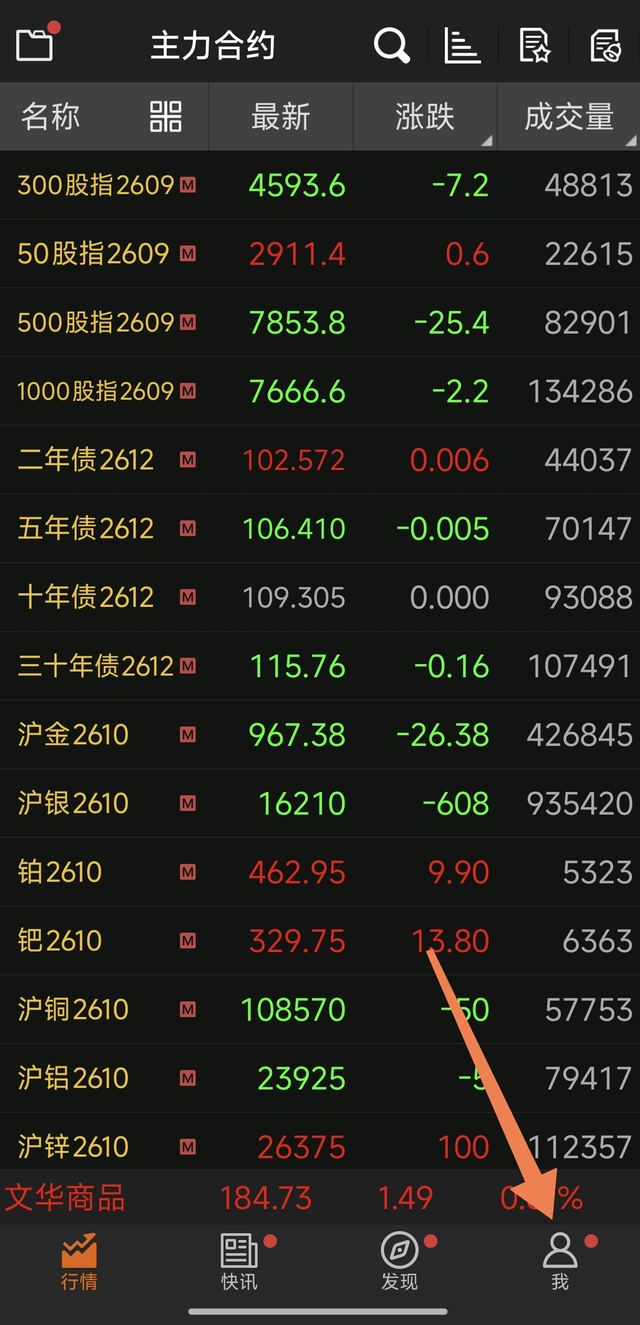
Open the app. You'll land on the quotes screen (主力合约 = main contracts list). Tap 我 (Me) at the bottom-right corner.
打开 App 后默认进入行情页(主力合约列表)。点右下角「我」。
Step 2 · 第二步:Tap 「点击登录/注册」(Log In / Register)
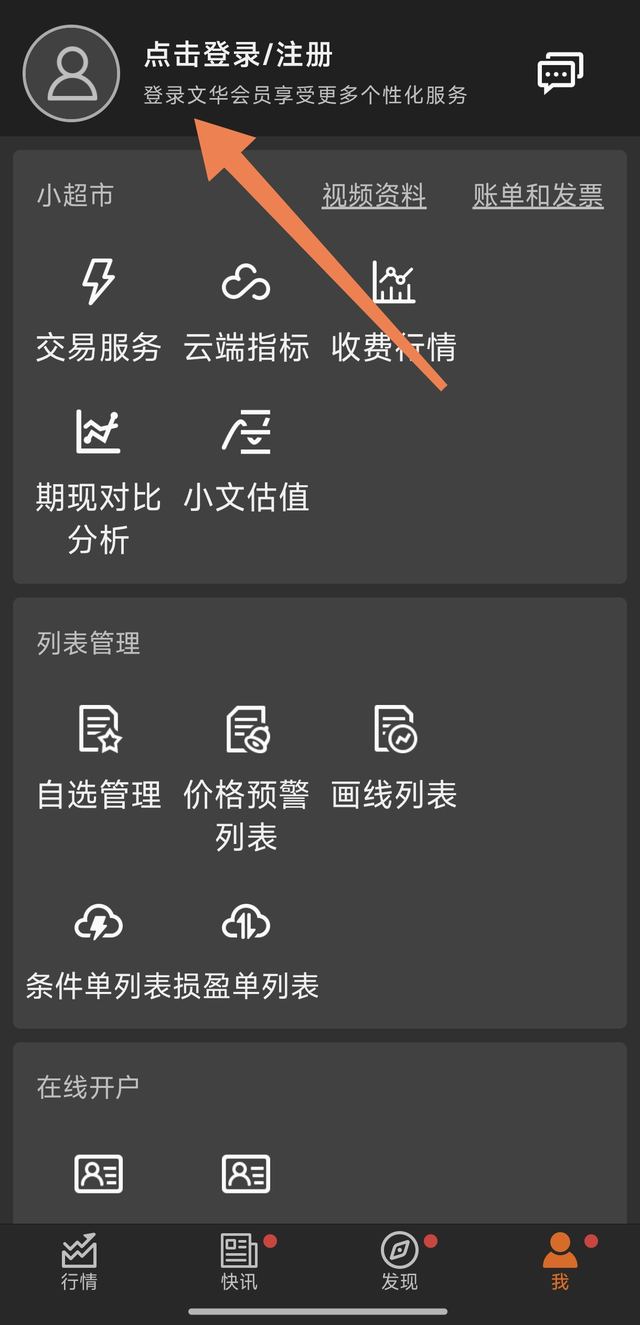
On the Me page, tap 点击登录/注册 (Tap to Log In / Register) at the top-left, next to the avatar.
在「我」页面,点左上角头像旁的「点击登录/注册」。
Step 3 · 第三步:Choose 「使用其他手机号登录」→ enter your XS account
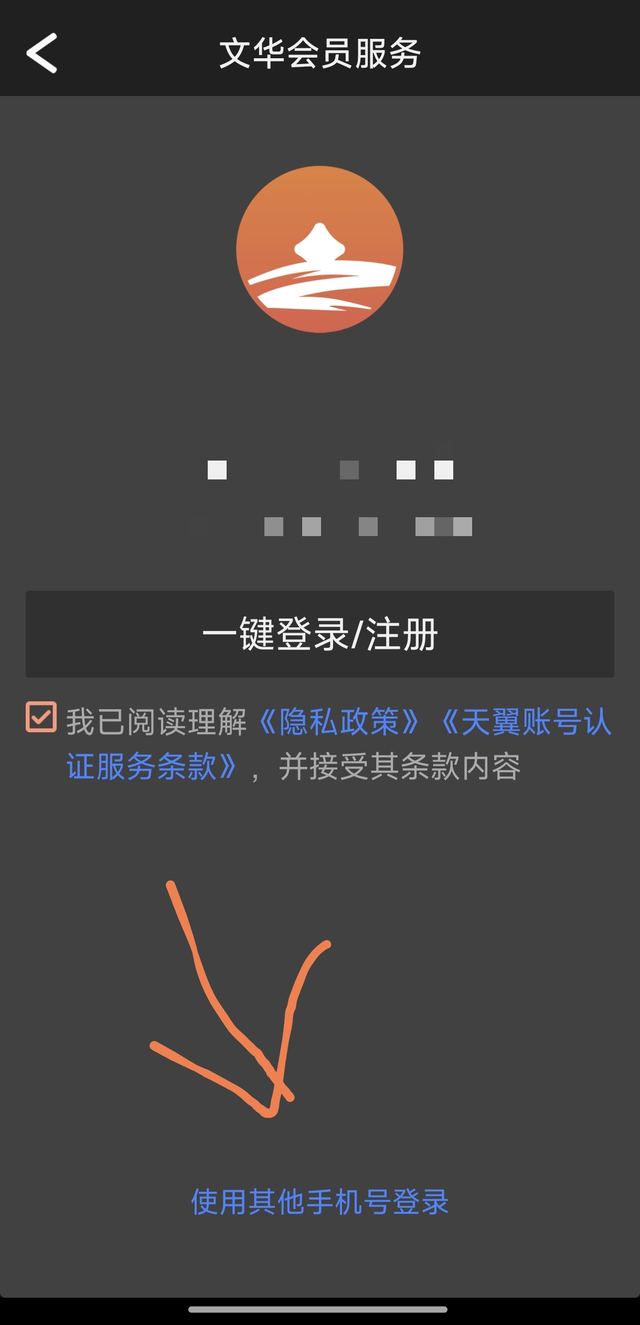
On the login screen: ① tick the agreement checkbox (我已阅读理解…) → ② tap 使用其他手机号登录 (Log in with a different phone number) at the very bottom → ③ enter the account number and password we emailed you. You're in.
在登录页:① 勾选底部协议框 → ② 点最底部的「使用其他手机号登录」→ ③ 输入我们邮件发给你的账户和密码,即可登录。
Step 4 · 第四步:Trade — Buy Long / Sell Short / Close
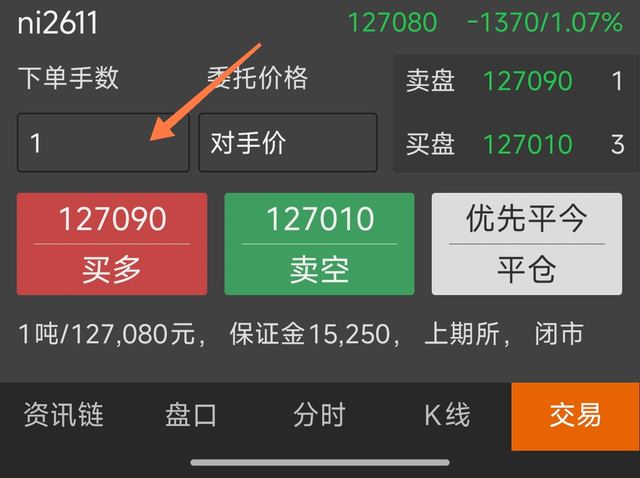
Tap 交易 (Trade) at the bottom to open the trading screen. To open a position: ① enter your size in 下单手数 (order lots) → ② tap the RED 买多 (Buy Long) button to go long, or the GREEN 卖空 (Sell Short) button to go short. To close: tap the white 平仓 (Close Position) button. Your open positions appear in the 持仓 (Positions) list below.
点底部「交易」进入交易界面。开仓:① 在「下单手数」输入手数 → ② 点红色「买多」=做多,或绿色「卖空」=做空。平仓:点白色「平仓」按钮。持仓显示在下方「持仓」列表里。
Good to Know · 常见问题速查
"The app shows 模拟 (simulated) next to my account — is that right?" Yes, completely normal. All evaluation and performance accounts are simulated accounts with real market data — this is the standard compliance structure of evaluation platforms worldwide. Your profit share is settled based on this account's real trading performance.
账户旁显示「模拟」是正常的:考核账户与绩效账户均为接入真实行情的模拟账户,这是全球选拔平台通用的合规结构,你的业绩报酬按该账户的真实交易表现结算。
委托价格 (order price)? Leave it at 对手价 (counterparty price) — this fills you immediately at the best opposing price, like a market order.
委托价格保持「对手价」即可——按对手最优价立即成交,相当于市价单。
持仓/挂单/委托/成交 = Positions / Working Orders / Order History / Fills.
持仓=当前仓位,挂单=未成交单,委托=委托记录,成交=成交记录。
权益 / 可用 / 使用率 = Equity / Available margin / Margin usage.
权益=账户净值,可用=可用保证金,使用率=保证金占用比例。
💬 Stuck anywhere? Email support@xsselect.com with a screenshot — we reply within 24 hours.
卡在任何一步?截图发到 support@xsselect.com,24小时内回复。